HTTP/2 is the first serious architectural upgrade to the web’s application protocol in decades. HTTP/1.1 carried the web for more than 15 years, but modern, asset-heavy pages exposed hard limits in connection management, head-of-line blocking, and protocol overhead. This log walks through how HTTP/2 changes the wire behavior and why it matters for performance, reliability, and security.
HTTP/2 also shows up outside the browser: gRPC uses HTTP/2 streams as its transport layer—see Transitioning from REST to gRPC: System Design and Tradeoffs.
From HTTP/0.9 to HTTP/2: why the protocol had to evolve
Brief evolution
HTTP/0.9(1991): single command (GET), simple HTML responses.HTTP/1.0(1996): headers, status codes, more methods, still connection-per-request behavior.HTTP/1.1(1997): persistent connections, chunked transfer, caching improvements.HTTP/2(2015): standardized after GoogleSPDY, focuses on latency, multiplexing, and security.
The core semantics (GET, POST, headers, status codes) stay the same. What changes is how those semantics are encoded and transported over a single TCP connection.
What a protocol actually is
At a basic level, a protocol defines:
- Header: metadata such as
source,destination,content-type,content-length. - Payload: application data such as HTML, JSON, images, CSS, JS.
- Footer: integrity or control information (checksums, terminators, etc., depending on layer).
In HTTP’s case:
- The header is the HTTP request or response header block.
- The payload is the body.
- Framing and validation live partly in HTTP, partly in underlying layers (
TCP,TLS).
HTTP/2 keeps the same semantics but completely redesigns how headers and payloads are framed and scheduled on the wire.
Why HTTP/1.1 stopped scaling
Under HTTP/1.1:
- Each
TCPconnection effectively handles one outstanding request at a time. - Browsers open multiple parallel connections (typically
6per origin) to increase concurrency.
This leads to:
- Connection thrash and congestion from many short-lived or underutilized connections.
- Head-of-line blocking at the HTTP layer when one slow response stalls others.
- Inefficient hacks to squeeze performance:
- Domain sharding
- Asset concatenation
- Image spriting
- Data inlining
These hacks fight the protocol rather than working with it.
HTTP/1.1 vs HTTP/2 at a glance
graph TD
    subgraph HTTP_2["HTTP/2"]
      C2[Client] -->|1 TCP connection with multiplexed streams| S2[Server]
    end
    subgraph HTTP_1_1["HTTP/1.1"]
      C1[Client] -->|6 TCP connections| S1[Server]

    end
| Aspect | HTTP/1.1 | HTTP/2 |
|---|---|---|
| Connections per origin | Many parallel TCP connections | One persistent TCP connection with many logical streams |
| Request concurrency | Limited by connections, head-of-line blocking | Multiplexed streams over a single connection |
| Framing | Text based | Binary framing layer |
| Header size | Repeated verbose headers | HPACK header compression |
| Server-initiated responses | Not part of core spec | Server Push for anticipated resources |
| Performance tuning | Relies on hacks (sharding, spriting, concatenation) | Built-in primitives (multiplexing, prioritization, push, compression) |
HTTP/2 is about fixing structural inefficiencies, not changing what GET /index.html means.
Core HTTP/2 design goals
HTTP/2 aims to deliver three properties within the protocol itself:
- Simplicity at the semantic level (existing HTTP concepts preserved).
- High performance by reducing application layer latency, minimizing connection count, and compressing headers.
- Robustness under real-world traffic: lossy networks, mobile devices, and heavy pages.
Mechanisms used to hit these goals:
- Multiplexed streams
- Binary framing
- Header compression (
HPACK) - Server Push
- Stream prioritization
- Better integration with
TLS
Multiplexed streams: many requests, one TCP connection
In HTTP/1.1, one request per connection at a time means:
- Slow responses block fast ones on the same connection.
- Browsers overcompensate by opening multiple connections.
HTTP/2 introduces a binary framing layer that:
- Splits each HTTP message into small frames.
- Tags frames with a stream ID (
streamId). - Interleaves frames from multiple streams on a single
TCPconnection. - Reassembles them per stream on the other side.
How multiplexing behaves
- Client opens one
TCPconnection. - Client sends multiple requests:
- Stream
1:GET /index.html - Stream
3:GET /style.css - Stream
5:GET /app.js
- Stream
- Server responds on all streams concurrently; frames interleave on the wire.
sequenceDiagram
    participant Client
    participant Conn as HTTP/2 Connection
    participant Server

    Client->>Conn: Open TCP + HTTP/2
    Client->>Conn: HEADERS(streamId=1, GET /index.html)
    Client->>Conn: HEADERS(streamId=3, GET /style.css)
    Client->>Conn: HEADERS(streamId=5, GET /app.js)

    Conn->>Server: Interleaved frames (1,3,5)
    Server-->>Conn: DATA(streamId=3, CSS...)
    Server-->>Conn: DATA(streamId=1, HTML...)
    Server-->>Conn: DATA(streamId=5, JS...)
    Conn-->>Client: Interleaved frames, reassembled per stream
Benefits:
- Parallel requests and responses do not block each other.
- A single
TCPconnection carries all streams, improving congestion behavior. - No need for domain sharding, spriting, or asset concatenation just to work around protocol limits.
Server Push: sending what the browser will need
Server Push lets the server send additional cacheable resources that the client has not explicitly requested yet but is very likely to need.
Example:
- Client requests
GET /index.html. - Server knows
/index.htmlreferences/style.cssand/app.js. - Server responds with:
index.htmlon the original stream.- Pushes
/style.cssand/app.json server-initiated streams.
High-level behavior:
- Server uses pseudo-headers such as
:pathto describe pushed resources. - Client caches pushed resources and can reuse them across pages.
- Client can cancel specific pushes or disable push entirely.
Why it matters:
- Saves request–response round trips.
- Reduces page load time when the server has accurate knowledge of dependencies.
- Works well with multiplexing because all pushes and responses share the same connection.
Binary framing instead of text
HTTP/1.x uses text-based framing:
- Lines like
GET / HTTP/1.1\r\nHost: example.com\r\n.... - Parsing requires careful delimiter handling and is error-prone.
HTTP/2 switches to a binary protocol:
- Fixed, well-defined frame headers.
- Clear separation of control versus data.
- Easier for machines to generate, parse, and validate.
Why binary helps:
- More compact on the wire.
- Less ambiguous parsing.
- Simpler to extend (
SETTINGSframes, new frame types). - Safer against text-based attacks that rely on header injection.
Semantics stay the same: browsers still operate with familiar request/response concepts; only the wire format changes.
Stream prioritization: telling the server what to care about
HTTP/2 lets clients express relative importance of streams:
- Each stream has a weight in the range
1to256. - Streams can depend on other streams.
Practical usage:
- HTML document and critical CSS or JS get higher priority.
- Images, analytics, or non-critical resources get lower priority.
The server is not strictly bound to follow priorities, but good implementations use them to schedule frames and improve perceived load time.
Security and authorization aspects
HTTP/2 aligns strongly with TLS:
- Browsers typically only enable HTTP/2 over
TLSusing ALPN (h2). - This unlocks newer
TLSfeatures and better cipher suites.
Additional pieces:
HPACKheader compression:- Compresses repeated header patterns.
- Reduces overhead for cookies and long header sets.
- Authorization requirements around Server Push:
- The server must only push resources it is authorized to serve.
- Pushed resources must be cacheable and tied to a valid origin.
Binary framing and HPACK do not eliminate all security issues, but they reduce some classes of HTTP/1.x text-based attacks.
Visual HTTP/1.1 vs HTTP/2 behavior with images
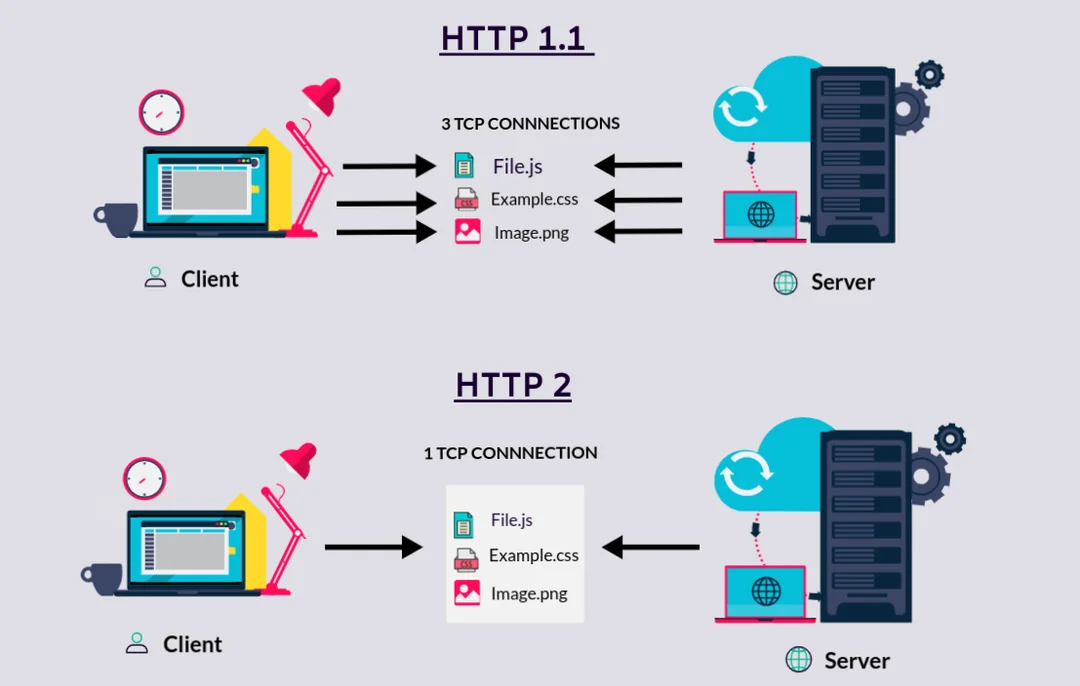

These figures complement the request-flow and architecture diagrams by giving an at-a-glance sense of why HTTP/2 matters for performance.
Mermaid: HTTP/1.1 vs HTTP/2 request flow
graph TD
    subgraph H2["HTTP/2 page load"]
      C2[Client] -->|single TCP conn| S2[Server]
      S2 -->|multiplexed HTML/CSS/JS/images| C2
    end
      subgraph H1["HTTP/1.1 page load"]
      C1[Client] -->|TCP conn #1| S1[Server]
      C1 -->|TCP conn #2| S1
      C1 -->|TCP conn #3| S1
      S1 -->|HTML| C1
      S1 -->|CSS| C1
      S1 -->|JS + images| C1
    end
This captures the key structural difference: multiple short-lived connections with serialized responses versus one long-lived multiplexed connection with interleaved responses.
Key takeaways
- HTTP/1.1 hit hard limits around concurrency and latency; hacks like domain sharding and spriting were symptoms of protocol constraints.
- HTTP/2 keeps HTTP semantics but changes the wire format with binary framing, multiplexed streams, and header compression.
- Multiplexing over a single TCP connection eliminates most head-of-line blocking at the HTTP layer and removes the need for many parallel connections.
- Server Push and stream prioritization let the server proactively send likely-needed resources and schedule what matters most for perceived performance.
- Binary framing and HPACK reduce ambiguity, overhead, and some classes of HTTP/1.x text-based attacks, pairing well with modern TLS.
- For real systems, adopting HTTP/2 is about letting the protocol handle concurrency and prioritization so you can delete performance hacks and focus on clean, cacheable asset design.
// SPONSORSHIP
If this research saved you time or improved your architecture, consider sponsoring my work on GitHub. All sponsorships go directly toward infrastructure and further technical research.
[ Become a Sponsor ]